Most “your credentials did not work” tickets on a Windows VPS end in the same place: a client-side .rdp file that overrides a working RDP configuration, combined with a CredSSP or NLA mismatch after a monthly patch. RDP settings resolve in a fixed order, so knowing which file wins is half the diagnosis. This guide covers the saved-settings precedence rules, the exact CredSSP error text, the event IDs to pull, and why the fix appears to revert after a patch cycle.
Where mstsc Actually Reads Its Defaults
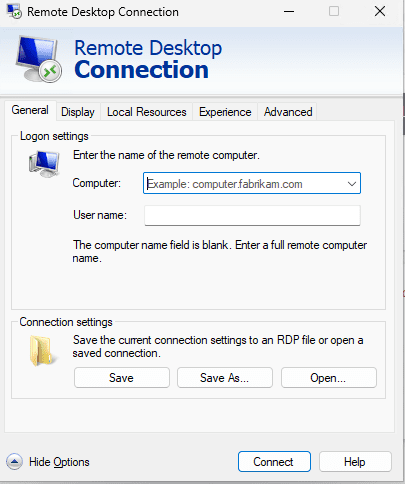
Pressing Enter in the mstsc dialog writes an Untitled connection to %USERPROFILE%\Documents\Default.rdp. That file is hidden, and it is the one mstsc merges into every .rdp file you open that lacks an explicit setting. The per-user registry key HKCU\Software\Microsoft\Terminal Server Client\Default only feeds the dialog for address and username until a connection is saved.
The resolution order, from weakest to strongest, is: policy-configured defaults, Default.rdp, the file you double-clicked, and finally command-line switches such as /admin. If Default.rdp contains authentication level:i:2 but your saved server file carries authentication level:i:0, the per-server file wins and CredSSP is skipped entirely.
authentication level:i:0– connect regardless of CredSSP; insecure.authentication level:i:1– server authentication required, warn on failure.authentication level:i:2– server authentication required, refuse to connect on failure.enablecredsspsupport:i:1– enables CredSSP; set to 0 only as a temporary diagnostic.negotiate security layer:i:1– NLA token request; required for NLA.
The CredSSP “Encryption Oracle” Error Decoded
The full message reads: “Authentication error occurred. The function requested is not supported” with origin VMWARE or a sub-code of 0x80090302 (SEC_E_UNSUPPORTED_FUNCTION). That is CredSSP patch asymmetry: one side supports the remediated CVE-2018-0886 mitigation matrix, the other does not.
The mitigation level lives in two policies, one per role. On the client it is Computer Configuration\Administrative Templates\System\Credentials Delegation\Encryption Oracle Remediation – registry value EncryptionOracle\Mitigation under HKLM\Software\Microsoft\Windows\CurrentVersion\Policies\System\CredSSP\Parameters\Client. On the server it is the same policy path on the target, registry key HKLM\Software\Microsoft\Windows\CurrentVersion\Policies\System\CredSSP\Parameters\Server.
| Value | Level | Behaviour |
|---|---|---|
| 0 | Force Updated Clients | Refuses any client that has not been patched. |
| 1 | Mitigated | Default on patched systems; blocks unpatched peers. |
| 2 | Vulnerable | Accepts everything; reopens the downgrade. |
NLA, Delegation and the “rds” Security Package
If NLA fails at the “Securing remote connection” step, the server-side policy Computer Configuration\Administrative Templates\Windows Components\Remote Desktop Services\Remote Desktop Session Host\Security\Require user authentication for remote connections by using Network Level Authentication is a common culprit. On a standalone Windows VPS, NLA works with built-in computer accounts, but a credential manager or SSO tool that delegates will fail when Allow Delegating Fresh Credentials is not configured and the client is not domain joined.
When mstsc is launched by a scheduled task or third-party tool that runs as SYSTEM or a service account, the TERMSRV/* service principal must be present in the Restricted Admin SPN list. Verify with setspn -L computer$; without it, NLA aborts with 0x80090346 (SEC_E_NO_CREDENTIALS) in the client event log.
Reproducing the Failure With a Clean Profile
Before changing policy, prove whether the client or the server is at fault. Launch mstsc from a profile with no Default.rdp file by running mstsc /v:203.0.113.10 /admin from a command prompt using a fresh Windows account. The /admin switch connects to the console session and bypasses some NLA pre-authentication paths, which is a useful split test: if /admin works but a normal connection fails, the problem is in NLA rather than in routing or certificate trust.
If the connection succeeds from a clean profile and fails from yours, the saved settings are the cause and you should resolve the same server with mstsc /v:203.0.113.10 /public then re-save. If it fails from every profile, pull the server-side events listed below before touching the client.
Event IDs to Pull First
| Event | Log | Meaning |
|---|---|---|
| 1149 | Microsoft-Windows-TerminalServices-RemoteConnectionManager/Operational | Pre-authentication failed (NLA rejected). |
| 1148 | Same | NLA credential check failed. |
| 1041 | Same | CredSSP handshake failure; includes the sub-code. |
| 65 | Microsoft-Windows-TerminalServices-LocalSessionManager/Operational | Session accepted after auth. |
| 36874/36888 | System, Schannel | TLS version or cipher rejected. |
| 5827 | System, Security | Policy blocks the logon. |
Pull the records on both ends with Get-WinEvent -FilterHashtable @{LogName='Microsoft-Windows-TerminalServices-RemoteConnectionManager/Operational'; Id=1149,1148,1041}. The client log always names the reason; the server log often names the exact cipher and certificate.
Why the Error Comes Back After a Patch Cycle
A monthly cumulative update can reset the CredSSP policy values under Policies\System\CredSSP when they were written as local policy rather than through GPO. Patching also reenumerates TLS cipher suites, so Enabled\SSL Ciphers under HKLM\SYSTEM\CurrentControlSet\Control\SecurityProviders\SCHANNEL gets subtly reordered. A client that negotiated AES-256-GCM in March can find itself offered only AES-128-SHA after the April rollup.
The durable fix is to reapply both policies via a Group Policy object or a startup script, not by hand. Write the client and server values into the same deployment, and export them with reg export before patching so you can compare after the fact.
A Checklist That Stays Fixed
- Delete or normalise
Default.rdpon every admin workstation. - Keep per-server files free of
authentication level:i:0. - Pin CredSSP mitigation to level 1 on client and server, via policy.
- Confirm NLA is required in the RDS Session Host policy and enforced in
HKLM\SYSTEM\CurrentControlSet\Control\Terminal Server\WinStations\RDP-Tcp\UserAuthentication. - Capture the Schannel cipher order in a baseline
netsh advfirewallcompanion script. - Retest after every rollup, before the next business day.
Once the policy is under version control and the .rdp files are tight, CredSSP against the oracle becomes a single-line log read instead of a fishing expedition. For the surrounding environment – disk, patching and firewall defaults – review our Windows VPS platform overview and the support contact page if a handshake failure persists across rebuilds.